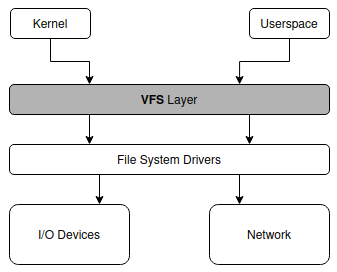
Nowadays there are many OSes available for many different hardware architectures, and probably there are even more file systems. One of the problems for the OS is to provide a generic enough interface to support as many file systems as possible, and making it easy to implement new ones, in the future. This is where the VFS layer comes to aid, in this chapter we are going to see in detail how it works, and make a basic implementation of it. To keep our design simple, the features of our VFS driver will be:
open, read, write, close, opendir, readdir, closedir, stat.This VFS is built on top of the previously defined resource API (see
Resource Management). The VFS creates a file-specific
resource_t for each open file and returns a handle that is
then used with the resource manager’s generic read,
write, and close functions that will perform
the proper handle-to-resource lookup and call our VFS
functions.
The basic concept of a VFS layer is pretty simple, we can see it like a common way to access files/directories across different file systems, it is a layer that sits between the higher level interface to the FS and the low level implementation of the FS driver, as shown in the picture:
How the different file systems are presented to the-end user depends on design decision. For example windows operating systems wants to keep different file systems logically separated using unit letters, while unix/linux systems represents them under the same tree, so a folder can be either on the same FS or on another one, but in both cases the idea is the same, we want to use the same functions to read/write files on them.
In this guide we will follow a unix approach. To better understand how does it works let’s have a look at this picture:
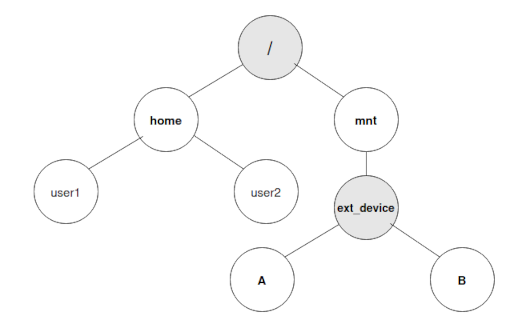
It shows a portion of a unix directory tree (starting from root), the gray circle represents actual file systems, while the white ones are directories.
So for example:
When a filesystem is mounted in a folder it means that the folder is no longer a container of other files/directories for the same filesystem but is referring to another one somewhere else (it can be a network drive, external device, an image file, etc.) and the folder takes the name of mountpoint.
Every mountpoint will contain the information on how to access the
target file system, so the VFS every time it has to access a file or
directory (i.e. a open function is called), it does the
following:
The multi-root approach, even if it is different, it share the same behaviour, the biggest difference is that instead of having to parse the path searching for a mountpoint, it has only to check the first item in the it to figure out which FS is attached to.
This is in a nutshell a very high level overview of how the virtual filesystem works, in the next paragraphs, we will go in more in details and explain all the steps involved and see how to add mountpoints, how to open/close files, read them.
Finally, we are going to write our implementation of the virtual file system, followed by an example driver (spoiler alert: the tar archive format). In this section, we will see how to:
To be able to access the different filesystems currently loaded (mounted) by the operating system it needs to keep track of where to access them (whether it is a drive letter or a directory), and how to access them (implementation functions), to do that we need two things:
As we anticipated earlier in this chapter we are going to use a linked list to keep track of the mounted file systems, even if it has several limitations and probably a tree is the best choice. We want to focus on the implementation details of the VFS without having to also write and explain the tree-handling functions.
So we assume that functions to handle list of mountpoints are present (their implementation is left as exercise), from now on we assume the following functions are present:
mountpoint_t *create_mountpoint(...);
mountpoint_t *add_mountpoint(mountpoint_t* mountpoint);
void remove_mountpoint(mountpoint_t* mountpoint);
We just said that we need a data structure to keep track of the information of a mounted file system, but what we need to keep track? Let’s see what we need to store:
fs_operations_t
(it will be another data structure).Let’s call this new structure mountpoint_t and start to
fill in some fields:
#define VFS_TYPE_LENGTH 32
#define VFS_PATH_LENGTH 64
typedef struct {

    char type[VFS_TYPE_LENGTH];
    char device[VFS_PATH_LENGTH];
    char mountpoint[VFS_PATH_LENGTH];

    // Driver provided file system operations (open/read/write/close)
    fs_operations_t *operations;

} mountpoint_t;
Note: When the VFS uses a mount to open a file, it will wrap the
result of the driver call into a resource_t and return the
resulting handle to userspace.
The next thing is to have a variable to store those mountpoints, since we are using a linked list it is going to be just a pointer to its root, this will be the first place where we will look whenever we want to access a folder or a file:
#define MAX_MOUNTPOINTS 12
mountpoint_t *mountpoints_root;
This is all that we need to keep track of the mountpoints.
Now that we have a representation of a mountpoint, is time to see how
to mount a file system. By mounting we mean making a
device/image/network storage able to be accessed by the operating system
on a target folder (the mountpoint) loading the driver and
the target device.
Usually, a mount operation requires a set of minimum three parameters:
There can be others of course, configuration parameters like access
permission, driver configuration attributes, etc. For now we haven’t
implemented a file system yet (we will do soon), but let’s assume that
our os has a driver for the USTAR fs (the one we will
implement later), and that the following functions are already
implemented:
int ustar_open(char *path, int flags);
int ustar_close(int ustar_fd);
void ustar_read(int ustar_fd, void *buffer, size_t count);
int ustar_close(int ustar_fd);
For the mount and umount operations, we will need two functions:
The first one for mounting, let’s call it for example
vfs_mount, to work it will need at least the parameters
explained above:
int vfs_mount(char *device, char *target, char *fs_type);Once called it will simply create and add a new item to the
mountpoints list, and will populate the data structure with the
information provided, for example inside the function to create a
mountpoint (in our example create_mountpoint) we are going
to have something like the following code:
mountpoint_t *new_mountpoint = malloc(sizeof(mountpoint_t)); // We assume a kind of malloc is present
if(new_mountpoint == NULL)
    return -1;
strcpy(new_mountpoint->device, device);
strcpy(new_mountpoint->type, type);
strcpy(new_mountpoint->mountpoint, target);
new_mountpoint->operations = NULL;
The last line will be populated soon, for now let’s leave it to
NULL.
The second instruction is for unmounting. In this case, since we are
just unloading the file device from the system, we don’t need to know
what type is it, so technically we need either the target device or the
target folder, the function can actually accept both parameters, but use
only one of them, let’s call it vfs_umount:
int vfs_umount(char *device, char *target);In this case we just need to find the item in the list that contains
the required file system, and if found remove it from the list/tree by
calling the remove_mountpoint function, making sure to free
all resources if possible, or return an error.
When the kernel first boots up, there is no file system mounted, and not all data structures are allocated, if we decide to use a linked list for example, before the initialization the pointer will point to nothing (or better to garbage) so we will need to allocate the first item of the list to have the first fs accessible.
In our case since we are using an array we need just to clean all the items in it order to make sure the kernel will not be tricked into thinking that there is a FS loaded, and we need an index pointer to know what is the position of the first available file system.
But where should be the first file system mounted? That again is depending on the project decisions:
Now that we know how to handle the mountpoints, we need to understand how given a path find the correct route toward the right mountpoint. Depending on the approach how a path is defined can vary slightly:
/path/to/folder/and/file<device_id>/path/to/folder/and/file (where device_id
is what identify the file system to be used, and the device, what it is
depend on the os, it can be a letter, a number, a mix, etc.)We will cover the single root approach, but eventually changing to a multi-root approach should be pretty easy. One last thing to keep in mind is that the path separator is another design decision, mostly every operating system use either “/” or “" (the latter is mostly on windows os and derivatives), but in theory everything can be used as a path separator, we will stick with the unix-friendly”/“, just keep in mind if going for the”windows” way, the separator is the same as the escape character, so it can interfere with the escape sequences.
For example, let’s assume that we have the following list of mountpoints :
And we want to access the following paths:
As we can see the first two paths have a common part, but belongs to different file system so we need to implement a function that given a path return a reference of the file system it belongs to.
How to do it is pretty simple, we scan the list, and search for the “longest” mountpoint that is contained in the path, so in the first example, we can see that there are two items in the array that are contained in the path: “/” (0), and “/home” (3), and the longest one is number 3, so this is the file system our function is going to return (whether it is going to be an id or the reference to the mountpoint item).
The second path instead has three mountpoints contained into it: /” (0), “/home/mount” (1), “/home” (3), in this case we are going to return 1.
The last one, has only one mountpoint that is contained into the path, and it is “/” (0).
In a single root scenario, there is always at least a mountpoint that is contained into the given path, and this is the root folder “/”.
What if for example path doesn’t start with a “/”? this means that it’s a relative path, it will be explained soon.
Implementing the function is left as exercise, below we just declare the header (that we will use in the next sections):
mountpoint_t get_mountpoint(char *path);If the above function fail it should return NULL to let
the caller know that something didn’t work (even if it should always
return at least the root / item in a single root
implementation).
Even though these concepts should already be familiar, let’s discuss
how they work from the VFS point of view. An absolute path is easy to
understand: it begins at the top of the filesystem tree and specifies
exactly where to go. The one caveat is that in a multi-root design is
that file-paths have to specify which filesystem they start from,
windows does this by prepending a device id like so: C: or
D:. A relative path begins traversing the filesystem from
the current directory. Sometimes this is indicated by starting the
filepath with a single dot ‘.’. A relative path is also one that doesn’t
begin at the file system root.
It can be easier to design a design our VFS to only accept absolute paths, and handle relative paths by combining them with the current working directory, giving us an absolute path. This removes the idea of relative paths from the VFS code and can greatly simplify the cases we have to handle.
As for how we track the current working directory of a program or user, that information is usually stored in a process’s control block, alongside things like privately mapped files (if support for those exists).
A filesystem driver also shouldn’t need to worry about full filepaths, rather it should only care about the path that comes after its root node.
After having implemented all the functions to load file systems and identify given a file path which mountpoint is containing it, we can now start to implement functions to opening and reading files.
Let’s quickly recap on how we usually read a file in C:
int file_descriptor;
char *buffer = calloc(11, sizeof(char));
if (buffer == NULL) {
    return -1;
}
int file_descriptor = open("/path/to/file/to_open", O_RDONLY);
int sz = read(file_descriptor, buffer, 10);
buffer[sz] = '\0';
printf("%s", buffer);
close(file_descriptor);
The code snippet above is using the C stdlib file handling libraries, what the it does is:
open to get the file descriptor id that will
contain information on how to access the file itself on the file
system.read
function will access it via the fd field), and store the output in the
buffer. The read function returns the number of bytes read.As we can see there are no instructions where we specify the file system type, or the driver to use this is all managed by the vfs layer. The above functions will avail of kernel system calls open/read/close, they usually sits somewhere above the kernel VFS layer, in our naive implementation they we are not going to create new system calls, and let them to be our VFS layer, and where needed make a simpler version of them.
We can assume that any file system i/o operation consists of three basic steps: opening the file, reading/writing from/to it and then closing it.
To open a file what we need to do is:
The function header for our open function will be:
int open(const char *filename, int flags);The flags parameter will tell how the file will be
opened, there are many flags, and the three below should be mutually
exclusive (please note that our example header is simplified compared to
the posix open, where there is the ... parameter, but for
our purposes not needed):
The flags value is a bitwise operator, and there are other possible values to be used, but for our purpose we will focus only on the three mentioned above.
The return value of the function is the file descriptor id (a resource handle). We have already seen how to parse a path and get the mountpoint id if it is available. But what about the file descriptor and its id? What is it? File descriptors represents a file resource that has been opened by the VFS, and contain information on how to access it (i.e. mountpoint_id), the filename, the various pointers to keep track of current read/write positions, eventual locks, etc. So before proceed let’s outline a very simple file descriptor struct:
typedef struct {
    uint64_t fs_file_id;
    int mountpoint_id;
    char *filename;
    int buf_read_pos;
    int buf_write_pos;
    int file_size;
    char *file_buffer;
} file_descriptor_t;
Where the mountpoint_id fields is the id of the mounted
file system that is containing the requested file. The
fs_file_id is the fs specific id of the fs opened by the
file descriptor, buf_read_pos and
buf_write_pos are the current positions of the buffer
pointer for the read and write operations and file_size is
the size of the opened file.
So once our open function has found the mountpoint for the requested file, eventually a new file descriptor item will be created and filled, and an resource handle returned. This id is different from the one in the data structure, since it represent the internal fs descriptor id, while this one represent the vfs descriptor id. In our case the descriptor list is implemented again using an array, so the id returned will be the array position where the descriptor is being filled.
Why “eventually”? Having found the mountpoint id for the file doesn’t mean that the file exists on that fs, the only thing that exist so far is the mountpoint, but after that the VFS can’t really know if the file exists or not, it has to defer this task to the fs driver, hence it will call the implementation of a function that open a file on that FS that will do the search and return an error if the file doesn’t exists.
But how to call the fs driver function? Earlier in this chapter when
we outlined the mountpoint_t structure we added a field
called operations, of type fs_operations_t and
left it unimplemented. Now is the time to implement it, this field is
going to contain the pointer to the driver functions that will be used
by the vfs to open, read, write, and close files:
struct fs_operations_t {
    int (*open)(const char *path, int flags, ... );
    int (*close)(int file_descriptor);
    ssize_t (*read)(int file_descriptor, char* read_buffer, size_t nbyte);
    ssize_t (*write)(int file_descriptor, const void* write_buffer, size_t nbyte);
};

typedef struct fs_operations_t;
The basic idea is that once mountpoint_id has been
found, the vfs will use the mountpoint item to call the fs driver
implementation of the open function, remember that when calling the
driver function, it cares only about the relative path with the
mountpoint folder stripped, if the whole path is passed, we will most
likely get an error. Since the fs root will start from within the
mountpoint folder we need to get the relative path, we will use the
get_rel_path function defined earlier in this chapter, and
the pseudocode for the open function should look similar to the
following:
int open(const char *path, int flags){
    mountpoint_t *mountpoint = get_mountpoint(pathname);

    if (mountpoint != NULL) {
        char *rel_path = get_rel_path(mountpoint, path);
        int fs_specific_id = mountpoint->operations->open(rel_path, flags);
        if (fs_specific_id != ERROR) {
            /* IMPLEMENTATION LEFT AS EXERCISE */
            // Get a new vfs descriptor id vfs_id
            vfs_opened_files[vfs_id] = //fill the file descriptor entry at position

            resource_t *res = // left as an exercise, see below

            // Open the resource and return its id to the calling process
            int handle = register_resource(current_process, res);
            return handle;
        }
    }
    return ERROR;
}
NOTE: When creating the resource_t for the file, the
impl field should store the file_descriptor_t
for this file and the funcs could be some global/static
table pointing to the series of functions that delegate the operation to
the resource’s mountpoint, defined below. This should NOT be
fs_operations_t as those are for the driver not the VFS
resource. As the open(...) is handled by the VFS there is
no need to define a resource function for that.
The pseudo code above should give us an idea of what is the workflow of opening a file from a VFS point of view, as we can see the process is pretty simple in principle: getting the mountpoint_id from the vfs, if one has been found get strip out the mountpoint path from the path name, and call the fs driver open function, if this function call is successful is time to initialize a new vfs file descriptor item.
Let’s now have a look at the close function, as
suggested by the name, this will do the opposite of the open function:
when called on a handle, it will free all the resources related to it.
The function signature is the following:
int close(resource_t* res);The res argument is the file resource to be closed, it
will be called from the close_resource(...) of the kernel’s
resource manager. It should first call the fs driver function to close a
file (if present), emptying all data structures associated to that file
descriptor (i.e. if there are data on pipes or FIFO they should be
discarded) and then doing the same with all the vfs resources, finally
it will mark this handle as available again.
We have only one problem how to mark a file descriptor available
using an array? One idea can be to use -1 as fs_file_id to
identify a position that is marked as available (so we will need to set
them to -1 when the vfs is initialized).
In our case where we have no FIFO or data-pipes, we can outline our close function as the following:
int close(resource_t* res) {

    // Your code should check that these actually exist
    file_descriptor_t* file = res->impl;
    mountpoint_t* mountpoint  = get_mountpoint_by_id(file.mountpoint_id);

    if (mountpoint->operations->close)
        mountpoint->operations->close(file->fs_file_id);

    free(f);
    remove_resource(current_process, res);

    return 0;
}
The above code expects a function to find a mountpoint given its id
get_mountpoint_by_id, the implementation is left as
exercise, since it’s pretty trivial and consists only of iterating
inside a list where the header is:
mountpoint_t *get_mountpoint_by_id(size_t mountpoint_id);This function will be used in the following paragraphs too.
So now we have managed to access a file stored somewhere on a file system using our VFS, and now we need to read its contents. The function used in the file read example at the beginning of this chapter is the C read include in unistd, with the following signature:
ssize_t read(resource_t* res, void *buf, size_t nbyte);Where the parameters are the opened file resource (res)
the buffer we want to read into (buf), and the number of
bytes (nbytes) we want to read.
The read function will return the number of bytes read, and in case
of failure -1. Like all other vfs functions, what the read will actually
do is verify the resource and then call the fs driver function to read
data from an opened file and fill the buf buffer.
Internally the file impl keeps track of a ‘read head’
which points to the last byte that was read. The next read() call will
start reading from this byte, before updating the pointer itself.
For example let’s imagine we have opened a text file with the following content:
Text example of a file...And we have the following code:
char *buffer[5];
int sz = read_resource(proc, file_handle, buffer, 5);
sz = read_resource(proc, file_descriptor, file_handle, 5);
The buffer content of the first read will be:
Text, and the second one examp. This is the
purpose buf_read_pos variable in the file descriptor, so it
basically needs to be incremented of nbytes, of course only if
buf_read_pos + nbytes < file_size . The pseudocode for
this function is going to be similar to the open/close:
ssize_t read(resource_t* res, void *buf, size_t nbytes) {

    // Your code should check these actually exist
    file_descriptor_t* file = res->impl;
    mountpoint_t* mountpoint  = get_mountpoint_by_id(file.mountpoint_id);

    int fs_file_id = file.fs_file_id;
    int bytes_read = mountpoint->operations->read(fs_file_id, buf, nbytes);

    if (file.buf_read_pos + nbytes < file.file_size) {
        file.buf_read_pos += nbytes;
    } else {
        file.buf_read_pos = file.file_size;
    }
    return bytes_read;
}
This is more or less all the code needed for the VFS level of the
read function, from the moment the driver read function
will be called the control will leave the VFS and will go one layer
below, and in most cases it will involve similar steps for the VFS with
few differences like:
The above differences are valid for all of the vfs calls.
Now that we have implemented the read function we should
be able to code a simple version of the write function, the
logic is more or less the same, and the two key differences are that we
are saving data (so it will call the fs driver equivalent for write) and
there probably be at least another addition to the file descriptor data
structure, to keep track of the position we are writing in (yes better
keep read and write pointers separated, even because files can be opened
in R/W mode). This is left as an exercise.
We have decided to not cover how to open and read directories, because the implementation will be similar to the above cases, where we need to identify the mountpoint, call the filesystem driver equivalent of the vfs function called, and make it available to the caller. This means that most of its implementation will be a repetition of what has been done until now, but there are few extra things we need to be aware:
readdir that will return the next
item stored into the directory, and if it reach the end NULL will be
returned.readdir (or similar) function.Initially let’s concentrate with the basic function for directory
handling: opendir, readdir and
closedir, then when we get a grasp on them we can implement
other more sophisticated functions.
In this chapter we outlined a naive VFS that abstracts access to different filesystems. The current feature-set is very basic, but it serves as a good starting point. From here we can begin to think about more features like memory mapping files and permissions.
We haven’t added any locks to protect our VFS data structures in order to keep the design simple. However in a real implementation this should be done. Implementing a file-cache/page-cache is also a useful feature to have, and can be a nice way to make use of all the extra physical memory we’ve had sitting around until now.
In the next section we’re going to implement a basic tempfs, with files loaded from a USTAR archive. This will result in our kernel being able to read files into memory and access them via the VFS.