Welcome to the first challenge of our osdev adventure! Memory
management in a kernel is a big area, and it can easily get very
complex. This chapter aims to breakdown the various layers you might use
in your kernel, and explain how each of them is useful.
The design and complexity of a memory manger can vary greatly, a lot
depends on how the operating system is designed, and its specific goals.
For example if only want mono-tasking os, with paging disabled and no
memory protection, it will probably be fairly simple to implement.
In this part we will try to cover a more common use case that is
probably what nearly all modern operating system uses, that is a 32/64i
bits operating system with paging enabled, and various forms of memory
allocators for the kernel and one for user space.
In the appendices there is also an additional section on memory
protection features available in some CPUs.
Authors note: don’t worry, we will try to keep it as simple as
possible, using basic algorithms and explaining all the gray areas as we
go. The logic may sometimes be hard to follow, you will most likely have
to go through several reads of this part multiple times.
Each of the layers has a dedicated chapter, however we’ll start with
a high level look at how they fit together. Before proceeding let’s
briefly define the concepts above:
Memory Management Layer
Description
Physical Memory Manager
Responsible for keeping track of which parts of the available
hardware memory (usually ram) are free/in-use. It usually allocates in
fixed size blocks, the native page size. This is 4096 bytes on x86.
Paging
It introduces the concepts of virtual memory and
virtual addresses, providing the OS with a bigger address
space, protection to the data and code in its pages, and isolation
between programs.
Virtual memory manager
For a lot of projects, the VMM and paging will be the same thing.
However the VMM should be seen as the virtual memory manager,
and paging is just one tool that it uses to accomplish its job: ensuring
that a program has memory where it needs it, when it needs it. Often
this is just mapping physical ram to the requested virtual address (via
paging or segmentation)
Heap Allocator
The VMM can handle page-sized allocations just fine, but that is not
always useful. A heap allocator allows for allocations of any size, big
or small.
A Word of Wisdom
As said at the beginning of this chapter Memory management is one of
the most important parts of a kernel, as every other part of the kernel
will interact with it in some way. It’s worth taking the extra time to
consider what features we want our PMM and VMM to have, and the
ramifications. A little planning now can save us a lot of headaches and
rewriting code later!
PMM - Physical
Memory Manager
The main features of a PMM are:
Exists at a system-level, there is only a single PMM per running os,
and it manages all of the available memory.
There are implementation that use a co-operative pmm per cpu core
design, which move excess free pages to other pmms, or request pages
from other pmms if needed. These can be extremely problematic if not
designed properly, and should be considered an advanced topic.
Keeps track of whether a page is currently in use, or free.
Is responsible for protecting non-usable memory regions from being
used as general memory (mmio, acpi or bootloader memory).
Usually this is the lowest level of allocation, and only the kernel
should access/use it.
Paging
Although Paging and VMM are strongly tied, let’s split this topic
into two parts: with paging we refer to the hardware paging mechanism,
that usually involves tables, and registers and address translation,
while the VMM it refers to the higher level (usually architecture
independent).
While writing the support for paging, independently there are few
future choices we need to think about now:
Are we going to have a single or multiple address spaces (i.e. every
task will have its own address space)? If yes in this case we need to
keep in mind that when mapping addresses we need to make sure they are
done on the right Virtual Memory Space. So usually a good idea is to add
an extra parameter to the mapping/unmapping functions that contains the
pointer to the root page table (for _x86_64 architecture is the PML4
table).
Are we going to support User and Supervisor mode? In this case we
need to make sure that the correct flag is set in the table
entries.
VMM - Virtual
Memory Manager
The VMM works tight with paging, but it’s a layer above, usually its
main features are:
Exists per process/running program.
Sets up an environment where the program can happily run code at
whatever addresses it needs, and access data where it needs too.
The VMM can be thought of a black-box to user programs, we ask it
for an address and it ‘just works’, returning memory where needed. It
can use several tools to accomplish this job:
Segmentation: Mostly obsolete in long mode, replaced by paging.
Paging: Can be used to map virtual pages (what the running code
sees) to physical pages (where it exists in real memory).
Swapping: Can ask other VMMs to swap their in-use memory to storage,
and handover any freed pages for us to use.
A simple implementation often only involves paging.
If using a higher half kernel, the upper half of every VMM will be
identical, and contain the protected kernel code and data.
Can present other resources via virtual memory to simplify their
interface, like memory mapping a file or inter-process
communication.
Similarly to paging there are some things we need to consider
depending on our future decisions:
If we are going to support multiple address spaces, we need to
initialize a different VMM for every task, so all the
initialization/allocation/free function should be aware of which is the
VMM that needs to be updated.
In case we want to implement User and Supervisor support, a good
idea is to have separate address space for the user processes/threads
and the supervisor one. Usually the supervisor address space is in the
higher half and the user space is in the lower half, as it starts at the
lowest address of the higher half of the address space (in x86_64 and
ricsv it is starting from: 0xFFFF800000000000)
Heap Allocator
There is a distinction to be made here, between the kernel heap and
the program heap. Many characteristic are similar between each other,
although different algorithm can be used. Usually there is just one
kernel heap, while every program will have its own userspace heap.
At least one per process/running program, and one for the
kernel.
Can be chained! Some designs are faster for specific tasks, and
often will operate on top of each other.
Can exist in kernel or user space.
Can manage memory of any size, unlike the VMM which often operates
in page-sized chunks (for simplicity). Often splitting the page-aligned
chunks given by the VMM into whatever the program requests via
malloc(xyz).
There are many different ways to implement one, the common choices
are:
Using a doubly linked list of nodes, with each tracking their size
and whether they are free or in use. Relatively simple to implement,
great for getting started. Prone to subtle bugs, and can start to slow
down after some time.
Buddy allocator. These are more complex to understand initially, but
are generally much faster to allocate/free. They can lead to more
fragmentation that a linked list style.
Slab allocator. These work in fixed sized chunks, memory can simply
be viewed as a single array of these chunks, and the allocator simply
needs a bitmap to keep track of which chunks are free or not.
The heap is implemented above the VMM, for the kernel one:
Even when using more than one address space per process/thread this
heap should be shared across all the address spaces.
The userspace heap, can be implemented separately, as a library, it
doesn’t matter. Every task/thread will have its own one in its own
address space.
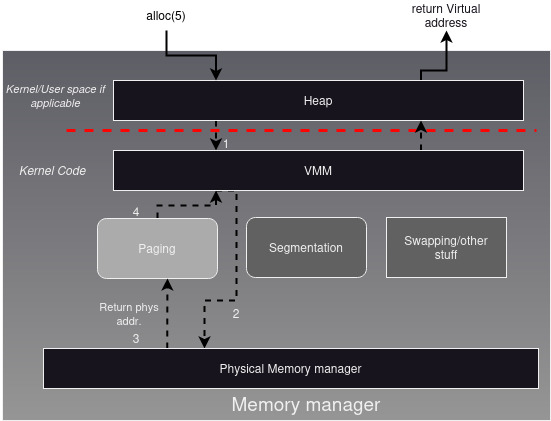
An Example Workflow
To get a better picture of how things work, let’s describe from a
high level how the various components work together with an example.
Suppose we want to allocate 5 bytes:
char*a = alloc(5);
What happens under the hood?
The alloc request the heap for pointer to an area of 5 bytes.
The heap allocator searches for a region big enough for 5 bytes, if
available in the current heap. If so, no need to dig down further, just
return what was found. However, if the current heap doesn’t contain an
area of 5 bytes that can be returned, it will need to expand. So it asks
for more space from the VMM. Remember: the addresses returned by the
heap are all virtual.
The VMM will allocate a region of virtual memory big enough for the
new heap expansion. It then asks the physical memory manager for a new
physical page to map there.
Lastly a new physical page from the PMM will be mapped to the VMM
(using paging for example). Now the VMM will provide the heap with the
extra space it needed, and the heap can return an address using this new
space.
The picture below identifies the various components of a basic memory
management setup and show how they interact in this example
scenario.